Maven - 上传中央仓库
NOTE
记录我上传 jar 包 Maven 中央仓库的过程,以及遇到的一些问题。
2022-02-07 @Young Kbt
介绍
我上传了我的 dbdtobean.jar 到 Maven 中央仓库,全名是 database data to java bean。
作用:读取数据库的表字段,生成 bean 文件,也就是实体类文件,并且可以选择的生成 MVC 类文件:Controller、Service、Mapper、Dao,其中每一个类文件可以选择生成五种方法:CRUD(增删改查)。
花了半天研究如何上传,期间也踩了一些坑,上传完立马过来记录过程。
使用网址
工单管理:https://issues.sonatype.org
这是我们的第一步,在这里面申请上传资格,以及注册自己的 groupId。
构建仓库 : https://s01.oss.sonatype.org/#welcome
获得上传资格后,我们把 jar 包上传到这里,并管理 jar 包,最终也在这里申请 Release 后,然会同步到 Maven 中央仓库。
说明,这个网址是官网提供最新的,网上一些旧的教程提供的是另一个网址,那个网址无法登录和上传。
仓库镜像: https://mvnrepository.com/
同步到 Maven 中央仓库后,等待 1-2 小时,我们就可以在这里面查看我们的 jar 包。
工单管理
注册账号
首先我们需要注册 JIRA 账号,也就是 Maven 仓库账号。
JIRA 是一个项目管理服务,类似于国内的 Teambition。Sonatype 通过 JIRA 来管理 OSSRH 仓库。
需要填写 Email,Full Name,Username 以及 Password,其中 Username 与 Password 后面的步骤需要用到,请记下来。
创建 issue
这一步就是申请上传 jar 包的资格。
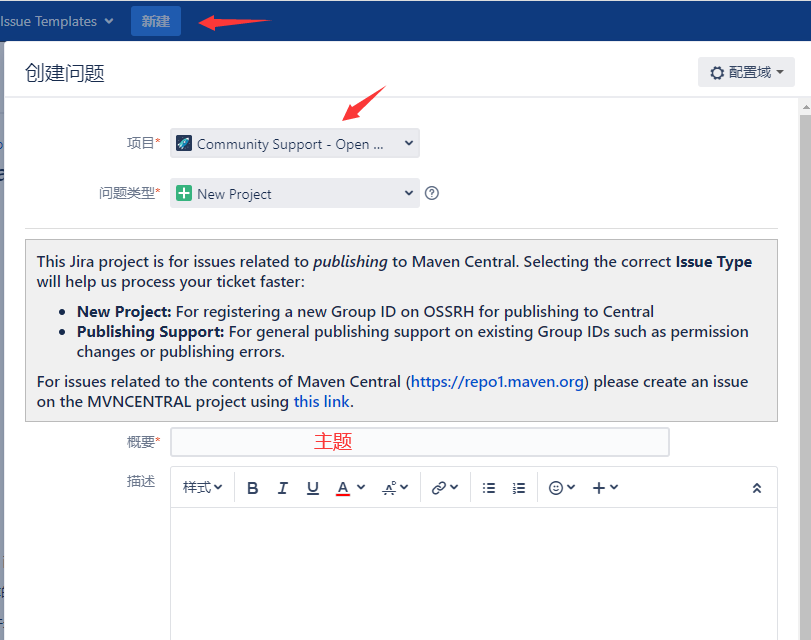
登录成功后,上方有个 Create(中文是创建)的按钮,点击后选择项目 Community Support - Open Source Project Repository Hosting (OSSRH)
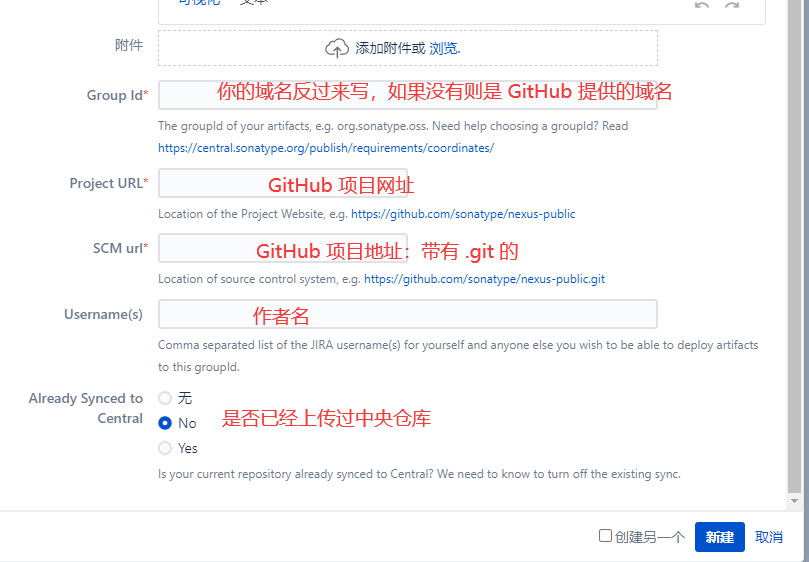
新建后,稍等几分钟到几个小时,可以看到管理员会提示去进行域名解析,添加提供好的字符串。
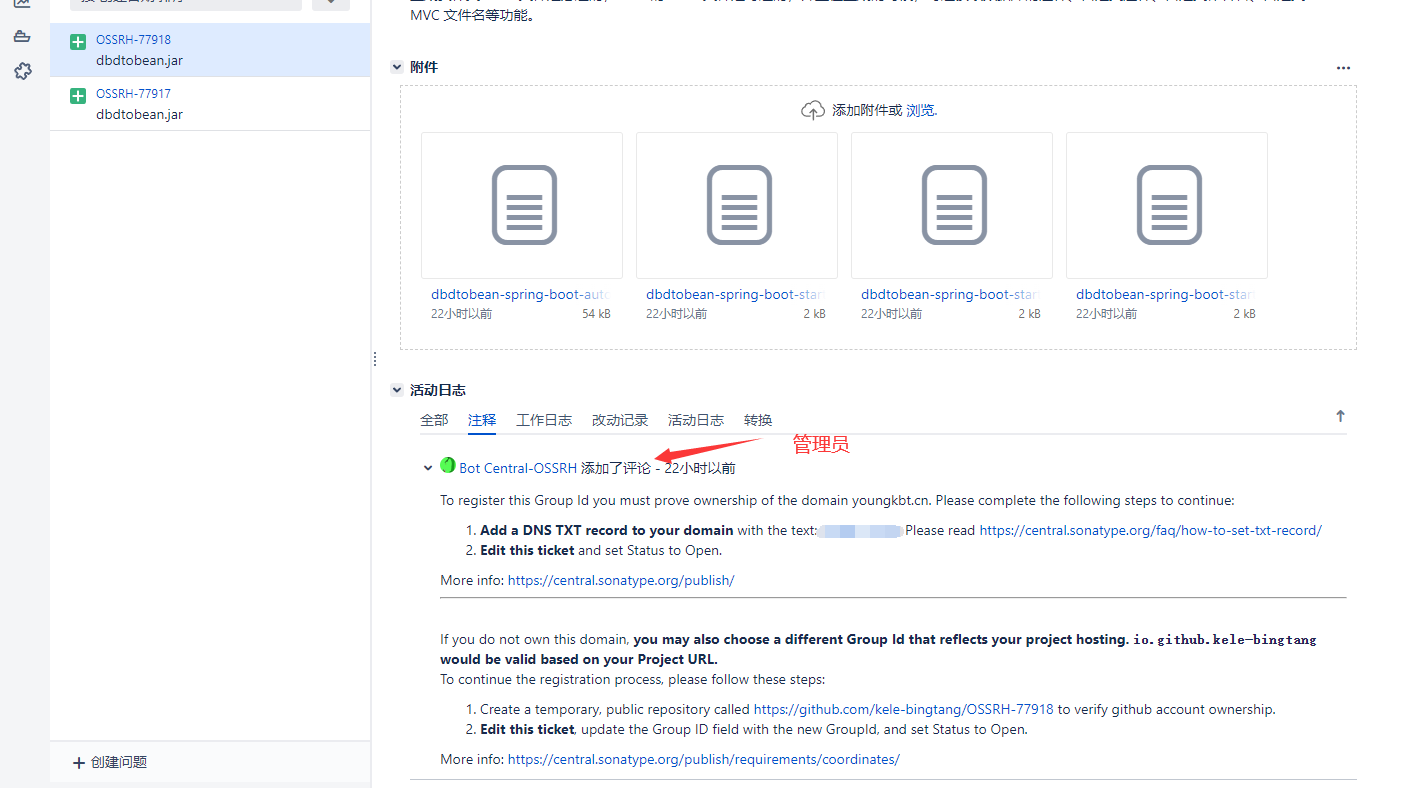
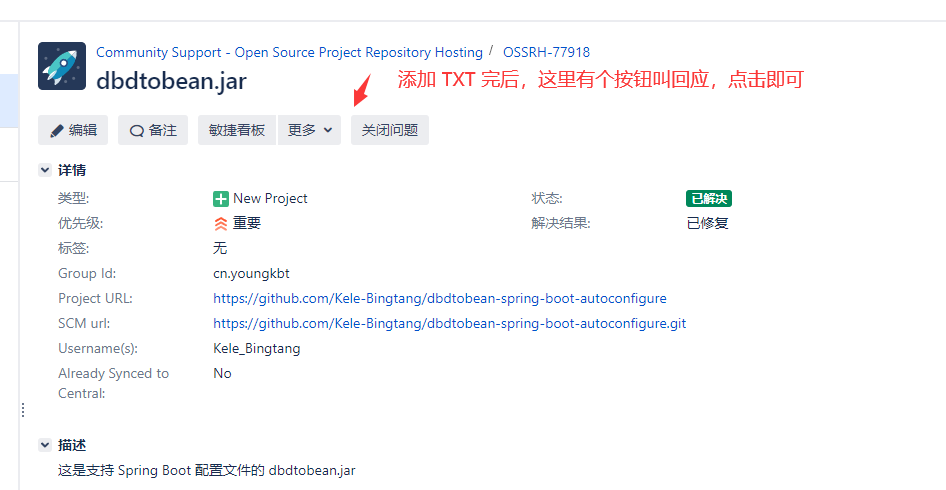
添加成功后,在页面上方点击「回应」,即可让管理员知道你的操作。
当 Issue 的 Status 变为 RESOLVED(中文是已解决,下图的绿色背景)后,就可以进行下一步操作了,否则,就先等待。
GPG 配置
发布到 Maven 仓库中的所有文件都要使用 GPG 签名,以保障完整性。因此,我们需要在本地安装并配置 GPG。
安装 GPG 非常简单,下载并安装 GPG 即可,根据自己的操作系统选择。
PS:必须安装 GPG,不然 Maven 不允许发布到中央仓库。
安装完后在命令行查看版本,验证是否成功:
gpg --version生成 GPG 密钥对
生成 GPG 密钥对,建议在 Git Bash Here 里(其实 Git 自带简易版 GPG,如果不想安装 GPG,则需要去环境变量配置 GPG,路径在 Git 根目录/usr/bin)。
生成 GPG 密钥对命令:
gpg --gen-key生成密钥时将需要输入 name、email 以及 password。password 在之后的步骤需要用到,请记下来。
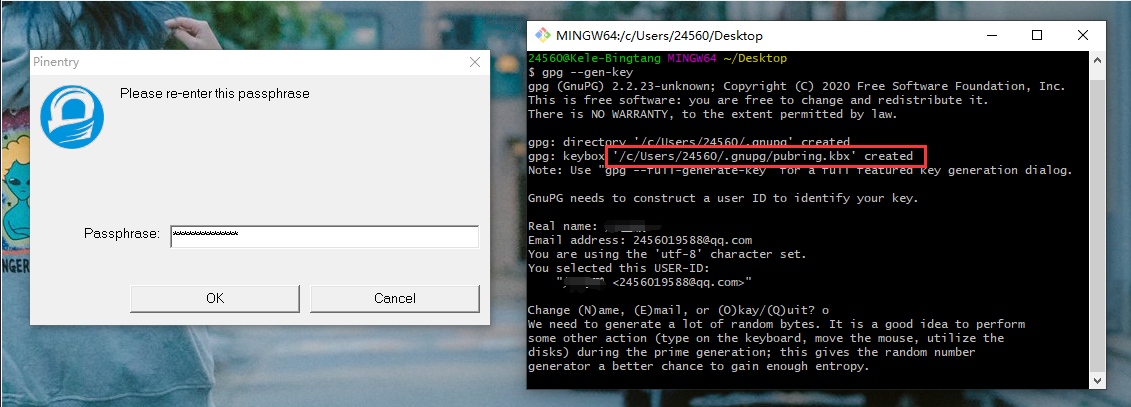
如果忘记了内容,则去 C/Users/用户名/.gnupg/pubring.kbx 查看内容。
上传 GPG 公钥
生成密钥后,要将公钥上传到公共的密钥服务器,这样其他人才可以通过公钥来验证 jar 包的完整性。
有三种方式,三选一即可,我选了第一个,因为第二个和第三个上传总是失败。
gpg --keyserver keyserver.ubuntu.com --send-keys 【your public key】
gpg --keyserver keys.openpgp.org --send-keys 【your public key】
gpg --keyserver pgp.mit.edu --send-keys 【your public key】如我的:
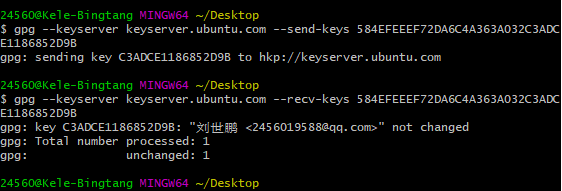
gpg --keyserver keyserver.ubuntu.com --send-keys 584EFEEEF72DA6C4A363A032C3ADCE1186852D9B查询是否上传成功:(对应上面的上传地址)
gpg --keyserver keyserver.ubuntu.com --recv-keys 【your public key】
gpg --keyserver keys.openpgp.org  --recv-keys 【your public key】
gpg --keyserver pgp.mit.edu --recv-keys 【your public key】如图:
项目配置
接下来就是项目的配置了:
- 配置上传的 Maven 中央仓库地址
- 配置上传的项目内容
- 配置文档生成插件
- 配置项目的 Git 地址
......
配置 settings.xml
配置 Maven 的 setting.xml,路径在 Maven 根目录下的 conf 目录下。
打开后,找到 servers 节点,添加两个 server 子节点
<servers>
    <server>
        <id>sonatype-nexus-snapshots</id>
        <username>Sonatype 账号</username>
        <password>Sonatype 密码</password>
    </server>
    <server>
        <id>sonatype-nexus-staging</id>
        <username>Sonatype 账号</username>
        <password>Sonatype 密码</password>
    </server>
</servers>两个 id 不要随便要改,下面的内容需要这两个 id,如果改,则下面的也要改。
Sonatype 账号和密码就是在工单管理注册的账号和密码。
配置 pom.xml
下面的配置是额外配置,一些基本的 pom 配置如依赖 dependencies,就是你的内容。
前面先介绍一步一步添加,后面我会提供完整版。
配置 groupId,和申请 issue 的一致,配置你的 name、description、url,如我的:
<groupId>cn.youngkbt</groupId>
<artifactId>dbdtobean-spring-boot-autoconfigure</artifactId>
<version>1.4</version>
<name>dbdtobean-spring-boot-autoconfigure</name>
<description>Read the table fields of the database and generate entity class files and curd class files of controller, service, Dao and mapper layers</description>
<url>https://github.com/Kele-Bingtang/DBDToBean</url>配置 licenses,这里直接使用 apache 提供的(无需修改)
<licenses>
    <license>
        <name>Server Side Public License</name>
        <url>http://www.apache.org/licenses/LICENSE-2.0.txt</url>
        <distribution>repo</distribution>
    </license>
</licenses>配置 scm,这是你的项目 Git 地址(需要修改)
<scm>
    <tag>master</tag>
    <!-- 项目的 Git 地址 -->
    <url>https://github.com/Kele-Bingtang/dbdtobean-spring-boot-autoconfigure</url>
    <!-- 项目的 http Git 地址 -->
    <connection>https://github.com/Kele-Bingtang/dbdtobean-spring-boot-autoconfigure.git</connection>
</scm>配置 repositories,这里的 id 对应配置 settings.xml 的 id(id 可修改,其他无需修改)
<repositories>
    <repository>
        <id>sonatype-nexus-snapshots</id>
        <name>Sonatype Nexus Snapshots</name>
        <url>https://oss.sonatype.org/content/repositories/snapshots</url>
        <releases>
            <enabled>false</enabled>
        </releases>
        <snapshots>
            <enabled>true</enabled>
        </snapshots>
    </repository>
</repositories>配置 distributionManagement。这是上传的仓库地址:快照版(Snapshots)和发布版(Release)(无需修改)
<distributionManagement>
    <snapshotRepository>
        <id>sonatype-nexus-snapshots</id>
        <name>Sonatype Nexus Snapshots</name>
        <url>https://s01.oss.sonatype.org/content/repositories/snapshots/</url>
    </snapshotRepository>
    <repository>
        <id>sonatype-nexus-staging</id>
        <name>Nexus Release Repository</name>
        <url>https://s01.oss.sonatype.org/service/local/staging/deploy/maven2/</url>
    </repository>
</distributionManagement>配置 profiles,里面的插件是 Maven 需要校验用到,如生成文档插件给开发人员看如何使用(无需修改)
注意:如果下载失败,则把
groupId、artifactId、version内容剪切到dependencies里下载成功后,再剪切回来。
<profiles>
    <profile>
        <id>sonatype-oss-release</id>
        <activation>
            <activeByDefault>true</activeByDefault>
        </activation>
        <build>
            <plugins>
                <plugin>
                    <groupId>org.apache.maven.plugins</groupId>
                    <artifactId>maven-source-plugin</artifactId>
                    <version>3.2.1</version>
                    <executions>
                        <execution>
                            <id>package</id>
                            <goals>
                                <goal>jar-no-fork</goal>
                            </goals>
                        </execution>
                    </executions>
                </plugin>
                <plugin>
                    <groupId>org.apache.maven.plugins</groupId>
                    <artifactId>maven-javadoc-plugin</artifactId>
                    <version>3.2.0</version>
                    <executions>
                        <execution>
                            <phase>package</phase>
                            <goals>
                                <goal>jar</goal>
                            </goals>
                        </execution>
                    </executions>
                </plugin>
                <plugin>
                    <groupId>org.apache.maven.plugins</groupId>
                    <artifactId>maven-gpg-plugin</artifactId>
                    <version>1.6</version>
                    <executions>
                        <execution>
                            <id>sign-artifacts</id>
                            <phase>verify</phase>
                            <goals>
                                <goal>sign</goal>
                            </goals>
                        </execution>
                    </executions>
                </plugin>
            </plugins>
        </build>
    </profile>
</profiles>最后配置你的 developers 个人信息(需要修改)
<developers>
    <developer>
        <name>Kele_Bingtang</name>
        <id>Kele_Bingtang</id>
        <email>2456019588@qq.com</email>
        <roles>
            <role>Developer</role>
        </roles>
        <timezone>+8</timezone>
    </developer>
</developers>我的 pom 完整版:
<?xml version="1.0" encoding="UTF-8"?>
<project xmlns="http://maven.apache.org/POM/4.0.0"
         xmlns:xsi="http://www.w3.org/2001/XMLSchema-instance"
         xsi:schemaLocation="http://maven.apache.org/POM/4.0.0 http://maven.apache.org/xsd/maven-4.0.0.xsd">
    <modelVersion>4.0.0</modelVersion>

    <groupId>cn.youngkbt</groupId>
    <artifactId>dbdtobean</artifactId>
    <version>1.4</version>
    <name>dbdtobean</name>
    <description>Read the table fields of the database and generate entity class files and curd class files of controller, service, Dao and mapper layers</description>
    <url>https://github.com/Kele-Bingtang/DBDToBean</url>

    <properties>
        <maven.compiler.source>8</maven.compiler.source>
        <maven.compiler.target>8</maven.compiler.target>
        <project.build.sourceEncoding>UTF-8</project.build.sourceEncoding>
    </properties>


    <licenses>
        <license>
            <name>Server Side Public License</name>
            <url>http://www.apache.org/licenses/LICENSE-2.0.txt</url>
            <distribution>repo</distribution>
        </license>
    </licenses>

    <scm>
        <tag>master</tag>
        <!-- 项目的 Git 地址 -->
        <url>https://github.com/Kele-Bingtang/DBDToBean</url>
        <!-- 项目的 http Git 地址 -->
        <connection>https://github.com/Kele-Bingtang/DBDToBean.git</connection>
    </scm>

    <repositories>
        <repository>
            <id>sonatype-nexus-snapshots</id>
            <name>Sonatype Nexus Snapshots</name>
            <url>https://oss.sonatype.org/content/repositories/snapshots</url>
            <releases>
                <enabled>false</enabled>
            </releases>
            <snapshots>
                <enabled>true</enabled>
            </snapshots>
        </repository>
    </repositories>


    <distributionManagement>
        <snapshotRepository>
            <id>sonatype-nexus-snapshots</id>
            <name>Sonatype Nexus Snapshots</name>
            <url>https://s01.oss.sonatype.org/content/repositories/snapshots/</url>
        </snapshotRepository>
        <repository>
            <id>sonatype-nexus-staging</id>
            <name>Nexus Release Repository</name>
            <url>https://s01.oss.sonatype.org/service/local/staging/deploy/maven2/</url>
        </repository>
    </distributionManagement>


    <profiles>
        <profile>
            <id>sonatype-oss-release</id>
            <activation>
                <activeByDefault>true</activeByDefault>
            </activation>
            <build>
                <plugins>
                    <plugin>
                        <groupId>org.apache.maven.plugins</groupId>
                        <artifactId>maven-source-plugin</artifactId>
                        <version>3.2.1</version>
                        <executions>
                            <execution>
                                <id>package</id>
                                <goals>
                                    <goal>jar-no-fork</goal>
                                </goals>
                            </execution>
                        </executions>
                    </plugin>
                    <plugin>
                        <groupId>org.apache.maven.plugins</groupId>
                        <artifactId>maven-javadoc-plugin</artifactId>
                        <version>3.2.0</version>
                        <executions>
                            <execution>
                                <phase>package</phase>
                                <goals>
                                    <goal>jar</goal>
                                </goals>
                            </execution>
                        </executions>
                    </plugin>
                    <plugin>
                        <groupId>org.apache.maven.plugins</groupId>
                        <artifactId>maven-gpg-plugin</artifactId>
                        <version>1.6</version>
                        <executions>
                            <execution>
                                <id>sign-artifacts</id>
                                <phase>verify</phase>
                                <goals>
                                    <goal>sign</goal>
                                </goals>
                            </execution>
                        </executions>
                    </plugin>
                </plugins>
            </build>
        </profile>
    </profiles>

    <developers>
        <developer>
            <name>Kele_Bingtang</name>
            <id>Kele_Bingtang</id>
            <email>2456019588@qq.com</email>
            <roles>
                <role>Developer</role>
            </roles>
            <timezone>+8</timezone>
        </developer>
    </developers>

</project>构建仓库
部署项目
项目配置成功后,开始部署到构建仓库
mvn clean deploy -P sonatype-oss-release -Darguments="gpg.passphrase=密钥密码"或者使用 IDEA 的界面操作
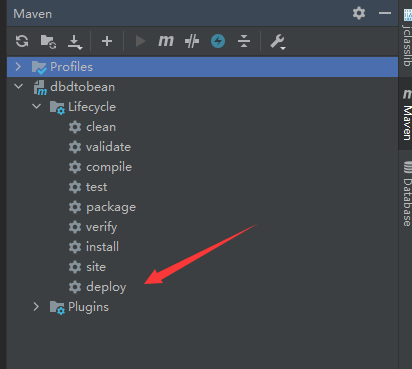
然后后弹出密码框,输入 gpg.passphrase,也就是之前生成 GPG 密钥对写的 passphrase。
执行成功的命令行会有 BUILD SUCCESS 提示。
上传中央仓库
mvn clean deploy 命令执行成功,使用 JIRA 账号登陆(界面右上角的 Login In):https://s01.oss.sonatype.org/#welcome。
登录成功后,点击左侧的 Staging Repositories 就可以看到你所发布的 jar 包了:
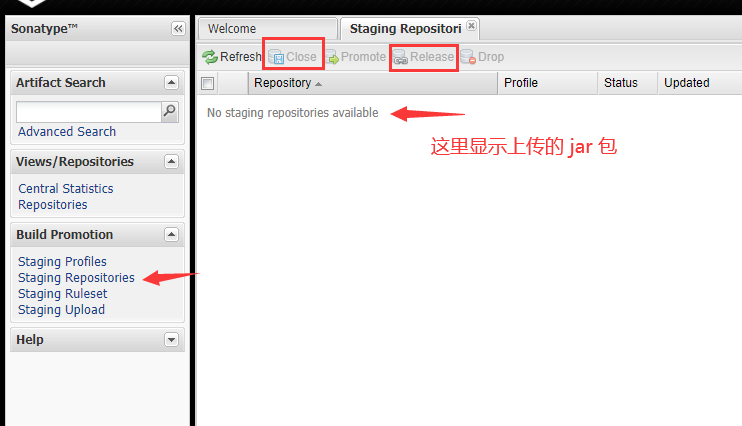
然后点击上方的 Close,并点击弹出的 Confrim,该按钮将会对上传的 jar 包进行检查校验
如果符合 Maven 的标准,则
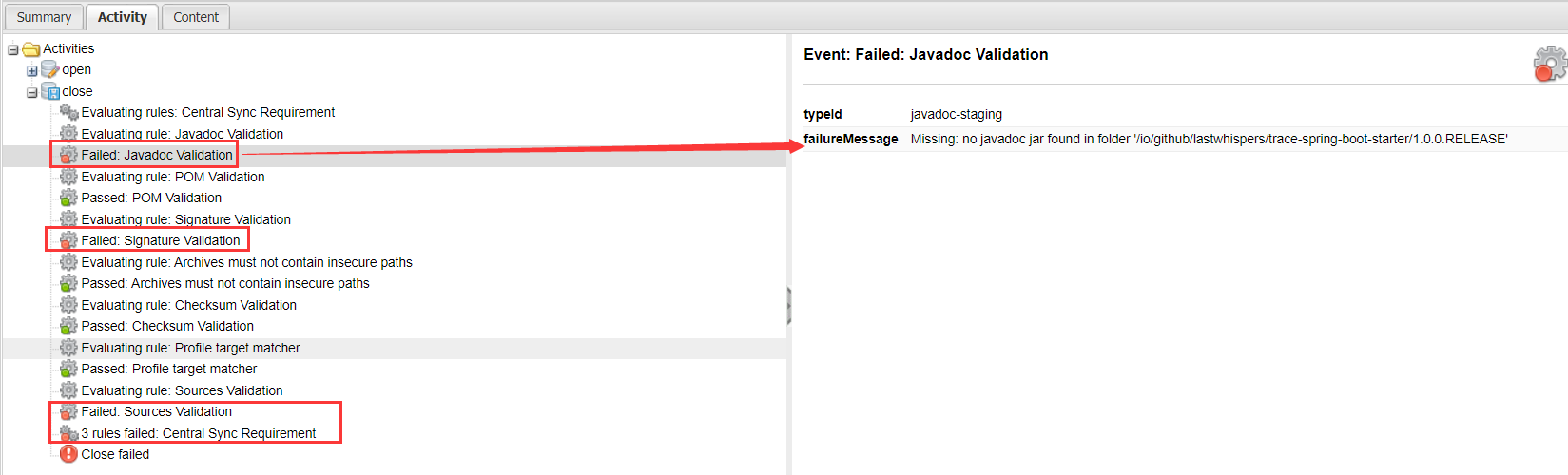
Release按钮变亮,点击Release并点击Comfirm后,等待 1-2 小时,就可以前往 https://mvnrepository.com/ 搜索自己的 jar 包。如果不符合 Maven 的标准,则在下方点击
Activity选项卡,查看错误信息,并回到项目代码进行修改
问题
Q:mvn clean deploy 时报 Failed to execute goal org.apache.maven.plugins:maven-gpg-plugin:1.5:sign (default) on project xxxx: Exit code: 1 -> [Help 1]
A:没有安装 GPG 或者没有配置 GPG 的环境变量,如果安装了 GPG,则在安装的过程 已经自动 配好环境变量。
Q:java.lang.IllegalArgumentException
A:环境变量的 Classpath 中把 %JAVA__HOME% 换成 JDK 的绝对路径。
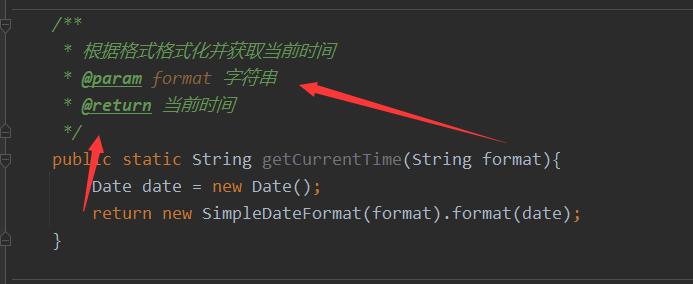
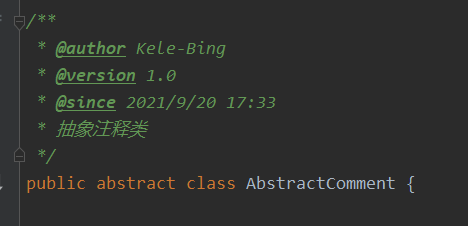
Q:Failed to execute goal org.apache.maven.plugins:maven-javadoc-plugin:3.2.0
方法的注释必须有@参数,开头的类注释只能是 @author、@version、@since,如下图:
Close 时,找不到 javadoc、source 等错误。
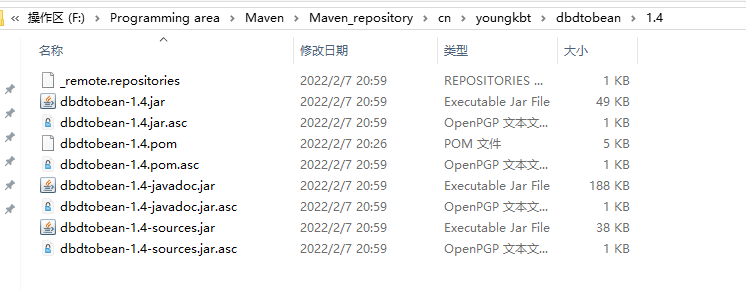
mvn clean deploy 时不能跳过 source、javadoc、gpg 插件。在个人的 maven repository 中要看到如下图文件后缀的文件