Tbeam - Ant Design Vue 3.x 表格 项目
前言
项目组长决定使用 Ant Design Vue 的最新 3.x 版本。(以下简称 ADVue)
我也是第一次使用这个 Vue 的 UI,之前在学习 Vue2 的时候听过这个 UI,是由饿了么团队打造出来的。
因为我是采购模块,所以我首先设计采购订单的界面,需要用到 ADVue 的 table 组件。
进入官网,找到组件,然后左侧往下拉,找到 Table 表格
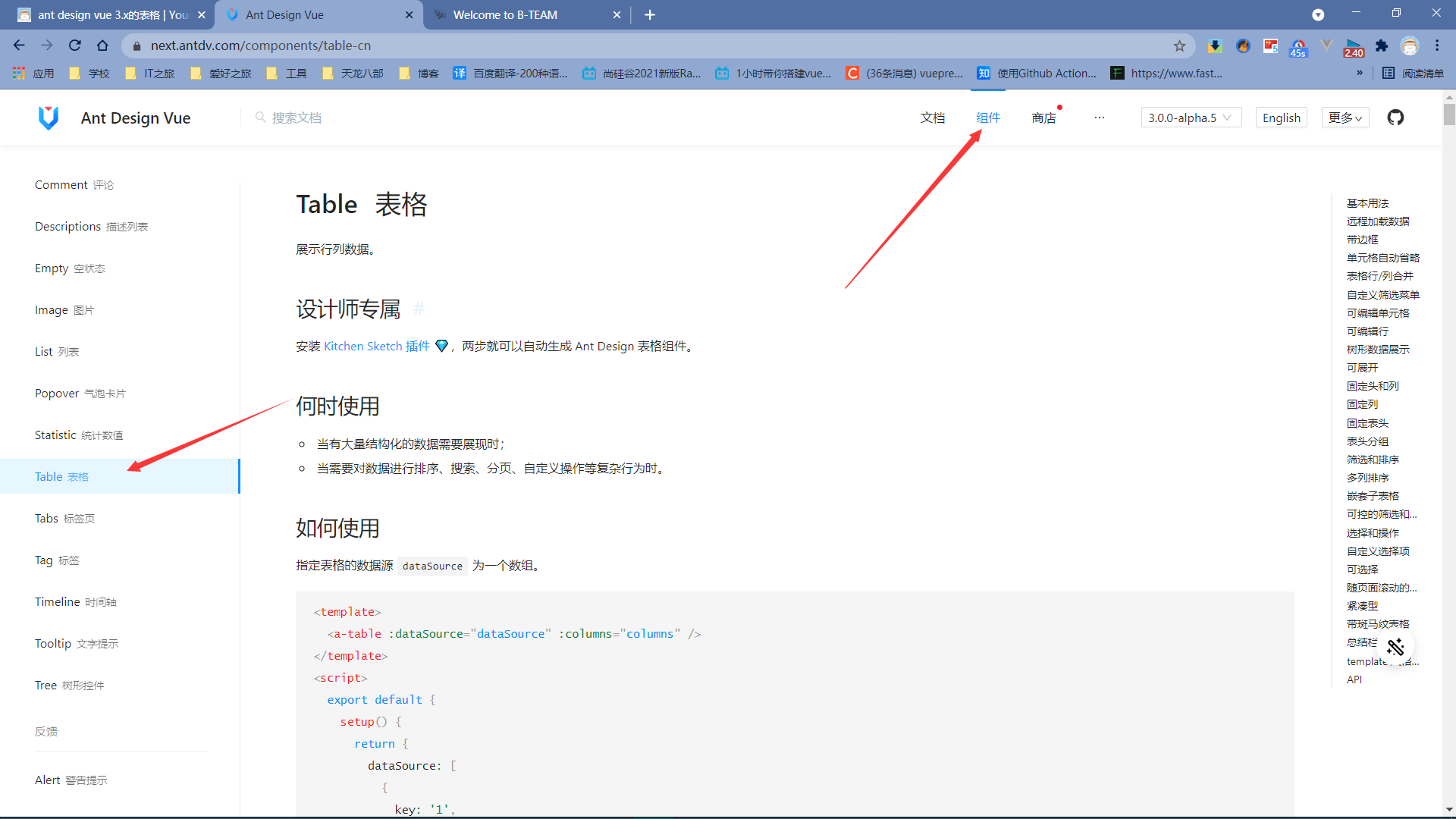
然后往下翻,我们使用的是有多选的表格,即每一列都可以进行选择。
使用步骤
- 当然是进行代码的 copy,然后 paste
- 根据模块,对官方自带的变量进行重命名
- 根据页面的显示,进行调式
- 模拟接口的数据请求
- 对表格的增删改操作
效果
经过一个下午的调式,我得出了如下结果
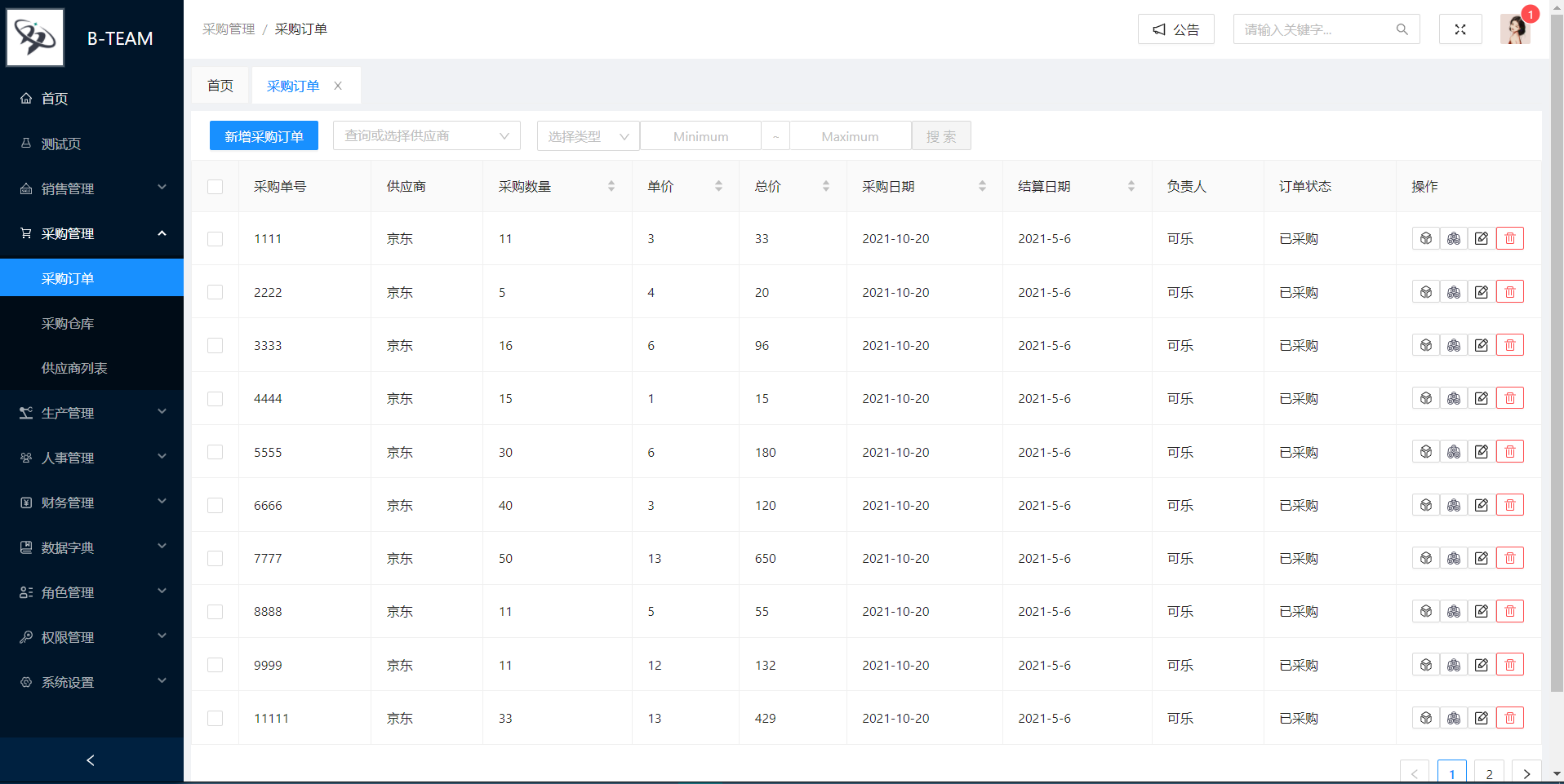
NOTE
操作的内容原本是文字,即增删改查,后来考虑字太长,替换为图标。
2021-10-26 @Young Kbt
代码如下
考虑代码长度,只有表格部分的代码。完整代码放到最下面
<template>
  <!-- 加载表格数据 -->
  <a-spin tip="数据正在加载中" :spinning="loading">
    <a-table
      :row-selection="{
        onChange: onSelectChange,
        selectedRowKeys,
        onSelect,
        onSelectAll,
      }"
      :columns="columns"
      :data-source="tableDataList"
      rowKey="id"
      bordered
    >
    </a-table>
  </a-spin>
</template>

<script lang="ts">
import {
  getCurrentInstance,
  defineComponent,
  ref,
  toRefs,
  reactive,
  onMounted,
  UnwrapRef,
} from "vue";
import { message, Modal } from "ant-design-vue";
import IconFont from "../../config/iconfont";
import { cloneDeep } from "lodash-es";
import { PurOrderType } from "../../assets/types/purchase/order";
import { SupplierType } from "../../assets/types/purchase/supplier";

// 表格表头
const columns = [
  {
    title: "采购单号",
    dataIndex: "id",
  },
  {
    title: "供应商",
    dataIndex: "supplier",
  },
  {
    title: "采购数量",
    dataIndex: "count",
    sorter: (a: PurOrderType, b: PurOrderType) => a.count - b.count,
  },
  {
    title: "单价",
    dataIndex: "price",
    sorter: (a: PurOrderType, b: PurOrderType) => a.price - b.price,
  },
  {
    title: "总价",
    dataIndex: "total",
    sorter: (a: PurOrderType, b: PurOrderType) => a.total - b.total,
  },
  {
    title: "采购日期",
    dataIndex: "buyTime",
    sorter: (a: PurOrderType, b: PurOrderType) => a.buyTime - b.buyTime,
  },
  {
    title: "结算日期",
    dataIndex: "settleTime",
    sorter: (a: PurOrderType, b: PurOrderType) => a.settleTime - b.settleTime,
  },
  {
    title: "负责人",
    dataIndex: "leader",
  },
  {
    title: "订单状态",
    dataIndex: "status",
  },
  {
    title: "操作",
    dataIndex: "operate",
    width: 155,
  },
];

export default defineComponent({
  name: "PurchaseOrder",
  components: {
    // 引入自定义图标
    IconFont,
  },
  setup() {
    // axios请求
    const $http = getCurrentInstance().appContext.config.globalProperties.$http;
    // 判断加载
    const loading = ref<boolean>(false);
    // reactive统一管理的数据
    const state = reactive({
      tableDataList: [], // 必须响应式
      selectedRowKeys: [],
    });
    // 表格的数据存储区
    const editableData: UnwrapRef<Record<string, PurOrderType>> = reactive({});

    // 初始化数据
    const initData = () => {
      loading.value = true;
      initTable();
      loading.value = false;
      message.success("数据加载成功");
    };

    // 加载表格数据
    const initTable = () => {
      $http.get("/purchase/order/orderList").then((res: any) => {
        state.tableDataList = res.data;
      });
    };

    // 目前没用,第一个参数是选中后的列id,第二个参数是选中的列信息
    const onSelectChange = (
      selectedRowKeys: (string | number)[],
      selectedRows: PurOrderType
    ) => {
      console.log(
        `selectedRowKeys: ${selectedRowKeys}`,
        "selectedRows: ",
        selectedRows
      );
      state.selectedRowKeys = selectedRowKeys;
    };
    // 选择某一列的回调
    const onSelect = (record, selected, selectedRows, nativeEvent) => {
      console.log("onSelect", record, selected, selectedRows, nativeEvent);
    };
    // 全选的回调
    const onSelectAll = (selected, selectedRows, changeRows) => {
      console.log("onSelectAll", selected, selectedRows, changeRows);
    };

    // 组件挂载页面后的回调,生命函数
    onMounted(() => {
      initData();
    });

    return {
      // 数据
      ...toRefs(state),
      columns,
      loading,
      editableData, //操作表格需要的存储区
      // 函数
      // 表格的选中 回到函数
      onSelectChange, // 选中表格某一列的回调
      onSelect, // 选中表格某一列的回调
      onSelectAll, // 全选表格的回调
      // 最后一列:操作 回调函数
      onProduce, // 点击商品类型回调
      onMaterial, // 点击商品原料回调
      onEdit, // 编辑回到
      onSave, // 保存回调
      onDelete, // 删除回调
      onCancel, // 返回回调
    };
  },
});
</script>

<style lang="less"></style>问题
写下这次文档的最终目的,就是记录自己遇到的问题啦~~~
编辑此处时间
现在是凌晨 12 点 43 分。
2021-11-27 @Young Kbt
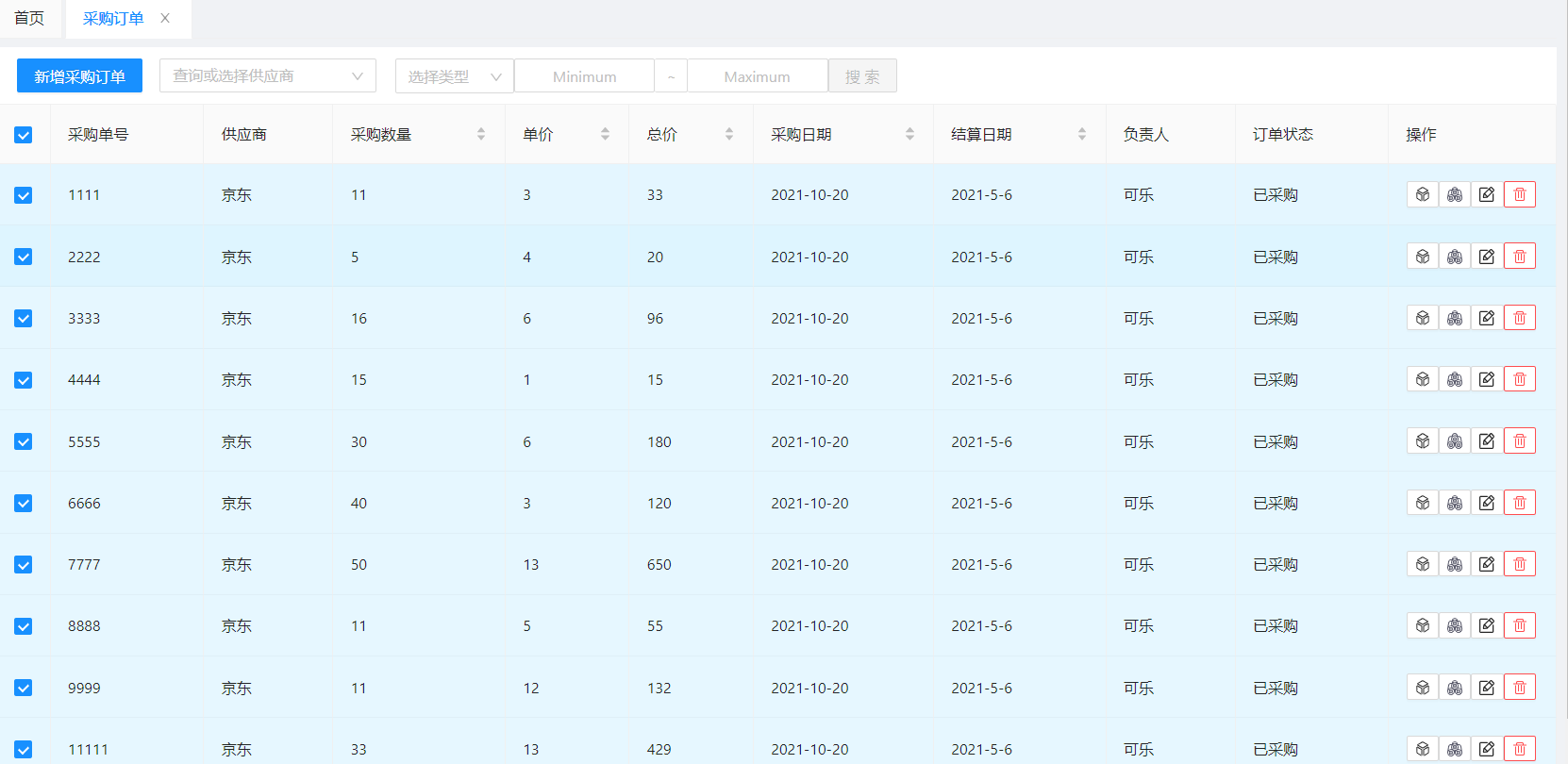
1.表格无法单选
调式过程,有时候选择某一列就全选所有列(不是点击采购订单左侧的按钮,而是表格里随便一个按钮)
刚洗完澡,还是冷水,宿舍已经停热水 ~~~ 继续更
原因:
经过多次调式,发觉还是要明白原理,才能解决问题
选择一列,实际上就是选择该列的唯一标识符,我这里就是 id,即采购订单,我出现上述问题是因为没有指定 id 作为唯一标识符,官方默认是 key 为标识符
于是,只需在 table 标签里加上 rowKey="id" 即可,如果自己的唯一标识符不是 id,也不是 key,则替换即可
<a-table :row-selection="{ onChange: onSelectChange, selectedRowKeys, onSelect,
onSelectAll, }" :columns="columns" :data-source="tableDataList" rowKey="id" //
这里 bordered >主要官方的示例代码没有用到 rowKey,它的例子直接指名唯一标识符为 key,也就是默认,所以不加 rowKey。
注意:如果指定的 rowKey 有两个重复,则选择任意一个,双方都会被选中。
2.编辑的简单原理
这个其实不是问题,是我在自己创建一个变量实现编辑的原理时,发现我 copy 官方的代码,已经自带了这个变量,于是我去掉了自己创建的变量,直接用官方的。
创建 reactive 变量 editableData 用于存储要编辑的列数据
vueconst editableData: UnwrapRef<Record<string, PurOrderType>> = reactive({});当点击编辑按钮时,触发回调函数,在回调里获得参数,通过该参数获得编辑的列数据,深克隆给 editableData
深克隆:复制了一份一模一样的数据,虽然双方拥有一样的数据,但是彼此互不干扰。
浅克隆:拿了对方一份数据,双方共享一份数据,任意一方修改,双方看到的数据就是修改后的数据。
js// 编辑列信息的回调 const onEdit = (key: string) => { // 深克隆 编辑的第一个列数据给editableData editableData[key] = cloneDeep( // tableDataList 存储所有表格的数据,可以通过id获取每一列的数据 state.tableDataList.filter((item) => key === item.id)[0] ); };编辑列数据其实就是修改 editableData 的值,当编辑后,点击保存,即可触发保存的回调函数
js// 保存编辑后列信息的回调 const onSave = (key: string) => { Object.assign( // 获取第一个修改的列 state.tableDataList.filter((item) => key === item.id)[0], // 整个表格的数据 editableData[key] ); // 退出编辑列信息 delete editableData[key]; };我觉得最妙的就是使用了 Object.assign 来进行对象的合并。
第一个参数是编辑前的列数据;
第二个参数是编辑后的列数据。
这个方法合并的两个参数对象里,如果出现了重复的属性,则以第二个参数为准,合并后的对象赋给第一个参数,所以最终第一个参数 state.tableDataList 既有自己不变的属性,也有修改后的属性,实现了编辑功能
 )
)
最后将修改后的列数据合并到之前没修改的数据里

其他
操作
原本操作的那一行是以文字表示,即

但是太多文字,容易发生页面能够左右移动,影响体验,所以替换为了图标
<a-button size="small" @click="onEdit(record.id)">
<!-- <p>编辑</p> -->
<icon-font type="bt-bianji" />
</a-button>其实把 p 标签换成了 icon 标签,这个标签是 ADVue 提供的,类型是阿里巴巴自己下载的图标,引入阿里巴巴矢量图标库即可。
iconfont.ts 文件
import { createFromIconfontCN } from "@ant-design/icons-vue";
const IconFont = createFromIconfontCN({
scriptUrl: "//at.alicdn.com/t/font_2856200_a28y0lzjxuv.js",
});
export default IconFont;自己写的 Vue 文件并注册,即可使用 icon 标签引入,type 对应的是矢量图标库的图标名字
import IconFont from "../../config/iconfont";
export default defineComponent({
components: {
// 引入自定义图标
IconFont,
},
});修改表格
如果想修改表格的某一行,通过 bodyCell 获取该列的信息,进行修改。后面我还利用这个实现了判断某一行数据是否为空,则默认显示一个数据的需求
<!-- 操作表格信息 column:当前列的信息 text:当前列的数据 record:当前行的数据-->
<template #bodyCell="{ column, text, record }">
<!-- 总价由价格和数量计算 -->
<span v-if="column.dataIndex == 'total'">
{{ record.count * record.price }}
</span>
</template>完整代码
完整代码
<template>
<a-space size="middle">
<!-- 新增按钮 -->
<a-button type="primary" style="left: 10px; margin: 10px">
新增采购订单
</a-button>
<!-- 搜索供应商 -->
<a-select
show-search
placeholder="查询或选择供应商"
style="width: 200px"
:options="supplierNameList"
@focus="supplierFocus"
@blur="supplierBlur"
@change="supplierChange"
/>
</a-space>
<!-- 范围搜索和精准搜索 -->
<a-tooltip placement="top" title="范围查询&精准查询&双点查询">
<a-select
style="width: 110px; margin-left: 18px"
placeholder="选择类型"
@select="onSearchType"
allowClear
>
<template v-for="item in searchTitle" :key="item.dataIndex">
<a-select-option :value="item.title">{{ item.title }}</a-select-option>
</template>
</a-select>
<a-input
v-model:value="minCodition"
style="width: 130px; text-align: center"
placeholder="Minimum"
/>
<a-input
style="
width: 30px;
border-left: 0;
pointer-events: none;
background-color: #fff;
"
placeholder="~"
disabled
/>
<a-input
v-model:value="maxCodition"
style="width: 130px; text-align: center; border-left: 0"
placeholder="Maximum"
/>
<a-button
type="primary"
:disabled="
(minCodition == '' || searchType == '') &&
(maxCodition == '' || searchType == '')
"
@click="onSearch"
>
搜索
</a-button>
</a-tooltip>
<!-- 加载表格数据 -->
<a-spin tip="数据正在加载中" :spinning="loading">
<a-table
:row-selection="{
onChange: onSelectChange,
selectedRowKeys,
onSelect,
onSelectAll,
}"
:columns="columns"
:data-source="tableDataList"
rowKey="id"
bordered
>
<!-- 操作表格信息 column:当前列的信息 text:当前列的数据 record:当前行的数据-->
<template #bodyCell="{ column, text, record }">
<!-- 总价由价格和数量计算 -->
<span v-if="column.dataIndex == 'total'">
{{ record.count * record.price }}
</span>
<template
v-if="
['supplier', 'count', 'price', 'settle', 'leader'].includes(
column.dataIndex
)
"
>
<a-input
v-if="editableData[record.id]"
v-model:value="editableData[record.id][column.dataIndex]"
style="margin: -5px 0"
/>
<template v-else>
{{ text }}
</template>
</template>
<!-- 如果是操作,则设置行工具 -->
<div v-else-if="column.dataIndex == 'operate'">
<!-- 编辑订单 -->
<template v-if="editableData[record.id]">
<a-button size="small" @click="onSave(record.id)">
<icon-font type="bt-baocun" />
</a-button>
<a-button size="small" @click="onCancel(record.id)" danger>
<icon-font type="bt-quxiao" />
</a-button>
</template>
<template v-else>
<!-- 查看产品信息 -->
<a-tooltip placement="top" title="产品信息">
<a-button size="small" @click="onProduce(record.produceId)">
<icon-font type="bt-chanpin" />
</a-button>
</a-tooltip>
<!-- 查看原料信息 -->
<a-tooltip placement="top" title="原料信息">
<a-button size="small" @click="onMaterial(record.id)">
<icon-font type="bt-yuanliaoguanli" />
</a-button>
</a-tooltip>
<!-- 编辑 -->
<a-button size="small" @click="onEdit(record.id)">
<icon-font type="bt-bianji" />
</a-button>
<!-- 删除 -->
<a-popconfirm
:title="'您确认删除' + record.id + '订单吗?'"
ok-text="没毛病"
cancel-text="点错了"
@confirm="onDelete(record.id)"
>
<a-button danger size="small">
<icon-font type="bt-shanchu" />
</a-button>
</a-popconfirm>
</template>
</div>
</template>
</a-table>
</a-spin>
</template>
<script lang="ts">
import {
getCurrentInstance,
defineComponent,
ref,
toRefs,
reactive,
onMounted,
UnwrapRef,
} from "vue";
import { message, Modal } from "ant-design-vue";
import IconFont from "../../config/iconfont";
import { cloneDeep } from "lodash-es";
import { PurOrderType } from "../../assets/types/purchase/order";
import { SupplierType } from "../../assets/types/purchase/supplier";
// 表格表头
const columns = [
{
title: "采购单号",
dataIndex: "id",
},
{
title: "供应商",
dataIndex: "supplier",
},
{
title: "采购数量",
dataIndex: "count",
sorter: (a: PurOrderType, b: PurOrderType) => a.count - b.count,
},
{
title: "单价",
dataIndex: "price",
sorter: (a: PurOrderType, b: PurOrderType) => a.price - b.price,
},
{
title: "总价",
dataIndex: "total",
sorter: (a: PurOrderType, b: PurOrderType) => a.total - b.total,
},
{
title: "采购日期",
dataIndex: "buyTime",
sorter: (a: PurOrderType, b: PurOrderType) => a.buyTime - b.buyTime,
},
{
title: "结算日期",
dataIndex: "settleTime",
sorter: (a: PurOrderType, b: PurOrderType) => a.settleTime - b.settleTime,
},
{
title: "负责人",
dataIndex: "leader",
},
{
title: "订单状态",
dataIndex: "status",
},
{
title: "操作",
dataIndex: "operate",
width: 155,
},
];
export default defineComponent({
name: "PurchaseOrder",
components: {
// 引入自定义图标
IconFont,
},
setup() {
// axios请求
const $http = getCurrentInstance().appContext.config.globalProperties.$http;
// 判断加载
const loading = ref<boolean>(false);
// reactive统一管理的数据
const state = reactive({
tableDataList: [], // 必须响应式
supplierNameList: [], // 如果优化,需要转为普通数组,因为无序修改,则无需响应式
searchTitle: [], // 同理,响应式消耗性能,不一定为响应式
selectedRowKeys: [],
});
// 搜索的左侧输入框内容
const minCodition = ref<string>("");
// 搜索的右侧输入框内容
const maxCodition = ref<string>("");
// 搜索的选择类型
const searchType = ref<string>("");
// 表格的数据存储区
const editableData: UnwrapRef<Record<string, PurOrderType>> = reactive({});
// 初始化数据
const initData = () => {
loading.value = true;
initSupplier();
initSearchTitle();
initTable();
loading.value = false;
message.success("数据加载成功");
};
// 加载表格数据
const initTable = () => {
$http.get("/purchase/order/orderList").then((res: any) => {
state.tableDataList = res.data;
});
};
// 初始化供应商
const initSupplier = () => {
$http.get("/purchase/order/supplierList").then((res: any) => {
// 后期如果接口返回的是供应商名字,则去掉下面代码
res.data.map((item: SupplierType) => {
state.supplierNameList.push(
Object.assign({}, {}, { value: item.name, label: item.name })
);
});
});
};
// 供应商选择后的回调
const supplierChange = (value: string) => {
console.log(`selected ${value}`);
};
// 供应商正在选择的回调
const supplierFocus = () => {
message.success("正在选择供应商");
};
// 供应商选择完成的回到
const supplierBlur = () => {
message.success("选择完成");
};
// 搜索选择,过滤掉供应商和操作
const initSearchTitle = () => {
state.searchTitle = columns
.filter((item) => item.dataIndex != "operate")
.filter((item) => item.dataIndex != "supplier");
};
// 选择搜索类型的回调
const onSearchType = (value) => {
console.log(`搜索的关键字:${value}`);
searchType.value = value;
};
// 搜索按钮的回调
const onSearch = () => {
console.log(`搜索的内容:${minCodition.value} - ${maxCodition.value}`);
};
// 目前没用,第一个参数是选中后的列id,第二个参数是选中的列信息
const onSelectChange = (
selectedRowKeys: (string | number)[],
selectedRows: PurOrderType
) => {
console.log(
`selectedRowKeys: ${selectedRowKeys}`,
"selectedRows: ",
selectedRows
);
state.selectedRowKeys = selectedRowKeys;
};
// 选择某一列的回调
const onSelect = (record, selected, selectedRows, nativeEvent) => {
console.log("onSelect", record, selected, selectedRows, nativeEvent);
};
// 全选的回调
const onSelectAll = (selected, selectedRows, changeRows) => {
console.log("onSelectAll", selected, selectedRows, changeRows);
};
// 查看订单产品信息
const onProduce = (produceId: string) => {
Modal.info({
title: produceId + "的产品信息为",
content: "无",
});
};
// 查看原料详情
const onMaterial = (id: string) => {
Modal.info({
title: id + "订单详情",
content: "无",
});
};
// 编辑列信息的回调
const onEdit = (key: string) => {
// 深克隆 编辑的第一个列数据给editableData
editableData[key] = cloneDeep(
state.tableDataList.filter((item) => key === item.id)[0]
);
};
// 保存编辑后列信息的回调
const onSave = (key: string) => {
  Object.assign(
    // 获取第一个修改的列
    state.tableDataList.filter((item) => key === item.id)[0],
    // 整个表格的数据
    editableData[key]
  );
  // 退出编辑列信息
  delete editableData[key];
};
// 删除列信息的回调
const onDelete = (key: string) => {
state.tableDataList = state.tableDataList.filter(
(item) => item.id !== key
);
};
// 退出编辑列信息的回调
const onCancel = (id: string) => {
delete editableData[id];
};
// 组件挂载页面后的回调,生命函数
onMounted(() => {
initData();
});
return {
// 数据
...toRefs(state),
columns,
loading,
minCodition,
maxCodition,
searchType,
editableData, //操作表格需要的存储区
// 函数
// 表上方的工具栏 回调函数
supplierChange, //供应商选中回调
supplierFocus, //供应商获得焦点
supplierBlur, //供应商失去焦点回调
onSearchType, // 查询类型回调
onSearch, //查询回调
// 表格的选中 回到函数
onSelectChange, // 选中表格某一列的回调
onSelect, // 选中表格某一列的回调
onSelectAll, // 全选表格的回调
// 最后一列:操作 回调函数
onProduce, // 点击商品类型回调
onMaterial, // 点击商品原料回调
onEdit, // 编辑回到
onSave, // 保存回调
onDelete, // 删除回调
onCancel, // 返回回调
};
},
});
</script>
<style lang="less"></style>